

Introduction
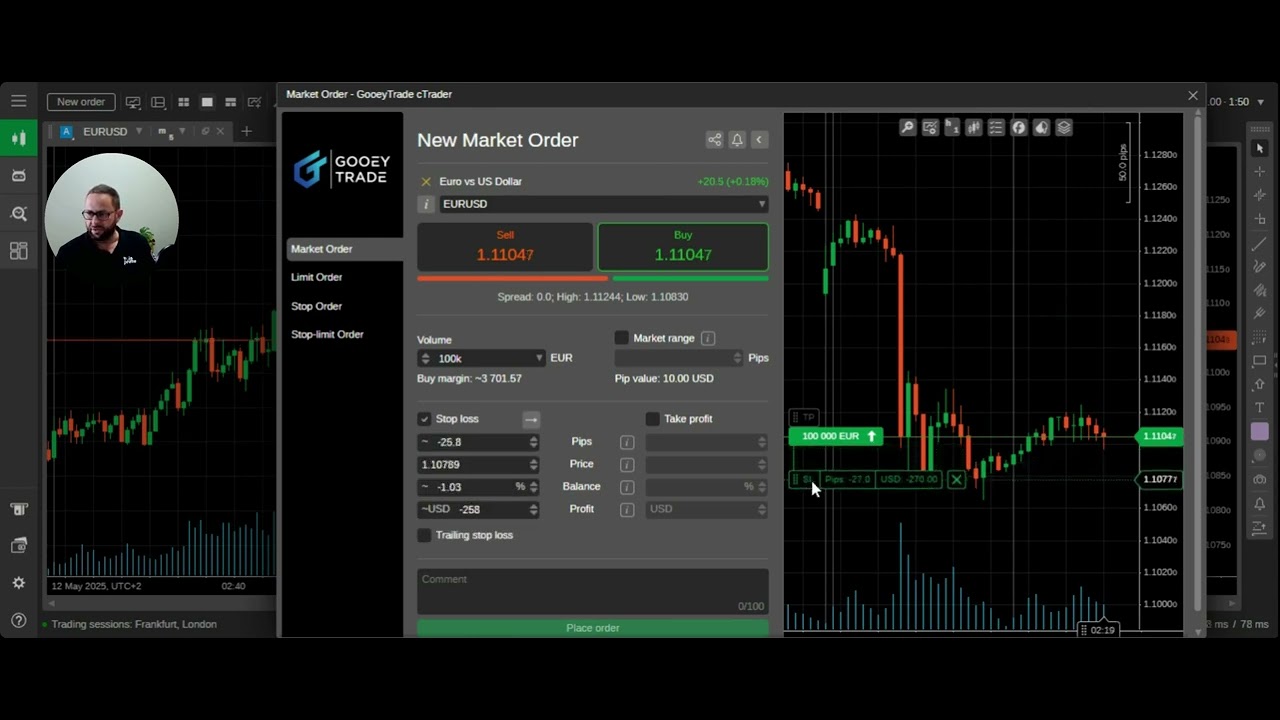
In this guide from Hola Prime, we’ll cover one of the most common reasons traders fail trading challenges: trading with lot sizes that are too large or not using a stop-loss. Both can quickly lead to breaching your maximum daily or overall loss limits. We’ll walk through how to use cTrader’s built-in risk management features to calculate the correct lot size based on your account size, stop-loss distance, and acceptable risk per trade.
1. Understanding Maximum Loss Limits
-
Two-Step Prime Challenge (Example)
-
Account size: $25,000
-
Daily loss limit: 5%
-
Overall loss limit: 10%
👉 Once you hit these thresholds, your challenge ends. Proper risk control ensures you stay within limits.
2. Why Lot Size and Stop-Loss Matter
-
Lot size too large: Risk per trade can exceed 2–3% very quickly.
-
No stop-loss: Sudden market moves (e.g., during news events) can wipe out your account.
-
Stacked losses: Consecutive oversized trades can easily breach limits.
3. Using the Risk Management Tool in cTrader
Example: $25,000 Account
-
Risk per trade: 0.5%–1% ($125–$250).
-
Instrument: EUR/USD on a 5-minute chart.
Setting Risk per Trade
-
Open the New Order window.
-
Choose market order or pending order.
-
Adjust stop-loss placement on the chart.
-
Use the volume (lot size) setting to match your risk.
4. Adjusting Lot Size (Volume) to Match Risk
-
On cTrader, Volume = Lot Size.
-
Default: 100,000 volume = 1 lot.
-
Example:
-
At 100,000 volume with a wide stop-loss, risk = ~$597 (2.4%) → too high.
-
Reduce volume to 40,000 → risk = ~$235 (~1%).
-
Reduce further to 30,000 → risk = ~$270 (~1%).
👉 Always adjust volume until the dollar risk equals your chosen risk percentage.
5. Stop-Loss Placement and Risk Calculation
-
Drag the stop-loss line on the chart to your chosen level.
-
The further away your stop-loss, the larger the risk.
-
If stop-loss is wider, reduce volume to keep risk constant.
-
If stop-loss is tighter, you can increase volume slightly while staying within risk limits.
6. Common Mistakes to Avoid
-
Trading without a stop-loss.
-
Using excessive lot sizes relative to account size.
-
Risking more than 1% per trade without a buffer.
-
Moving your stop-loss further after entry.
7. Key Takeaways for Safer Trading
-
Always know your daily and overall loss limits.
-
Use a stop-loss on every trade.
-
Risk only 0.5%–1% per trade.
-
Adjust volume (lot size) to match your chosen risk.
-
Accept small losses — protecting your account keeps you in the game.
Conclusion
Risk management is the cornerstone of trading success. By combining proper stop-loss placement with controlled lot sizing, you can stay well within your daily and overall loss limits.
Next time you trade on cTrader, use the built-in risk calculation tool to ensure every position reflects the exact amount you’re comfortable risking.
.png)
.png)
.png)

.png)
.png)
.png)